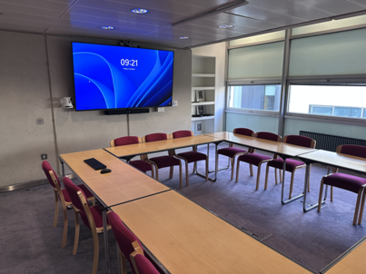
This is a well equipped, compact seminar room situated on the first floor of the Faculty. It has a conferencing system that supports in-person and hybrid meetings, and it can also be used for lectures. The large screen has a PC incorporated, accessed by a wireless keyboard and mouse and you can also connect your own laptops via a variety of connectors.
| Maximum Seating Capacity |
| 16 |
| Hybrid Teaching |
| Yes |
| Lecture Recording |
| Yes |
Technical Specifications
| PC | Windows 11 PC connected the the internet. This is a University Managed Desktop device requiring a University password. Accessed via a wireless keyboard and mouse. |
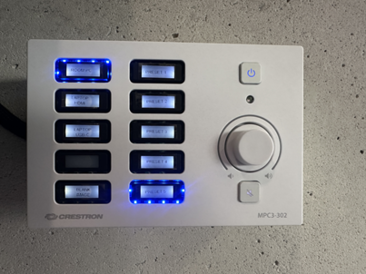
| Camera | One pan, tilt and zoom camera, located at the front of the room. 1080p/60Hz resolution. Controlled by the panel to the right of the screen. |
| Speakers | Wall mounted, located under the screen. |
| Microphones | Located in the speaker enclosure. |
| External Connectors | Connection for laptop projection via USB-c and HDMI. |
Software and Lecture Capture
| Office 365 | Access to the University Microsoft Office suite including: - Powerpoint
- Word
- Teams
- Email (via a browser)
Please note that if logging into Microsoft products you may be prompted for further authentication via your preferred multi-factor authentication route. |
| Panopto | Sign-in via University account (Raven) credentials. Recording of camera view and slides or PC screen. Integrates with Moodle for direct uploading of recording to the relevant course. |
| Zoom | Zoom licencing is the responsibility of the participants hosting the meeting. Zoom will need installing the first time it is used when the individual signs in to the PC. |
| Teams | University access to Teams. Meetings can be joined via Teams or your Microsoft Outlook calendar. Screen sharing and recording is available. Recordings are available on the host's meeting chat and can be uploaded on to Moodle via Panopto. |
| VLC Player | Media player supporting a wide range of formats. |
Accessibility
| Location | First floor. |
| Lift Access | Yes. Contact reception for an access card. |
| Accessibility Seating | No specific accessibility seating. Power sockets are available. |
| Hearing Loop | No. |
| Speech-to-Text | As the lecturer speaks, it is transcribed and displayed with their presentation. Available via Google Slides. Powerpoint slides can be imported. |